
Workstream US
Workstream.isBusiness
3.567.00 Reviews
- Version
- v2.12.17
- Installs
- 100.00K
- Age Rating
- Everyone
Screenshots
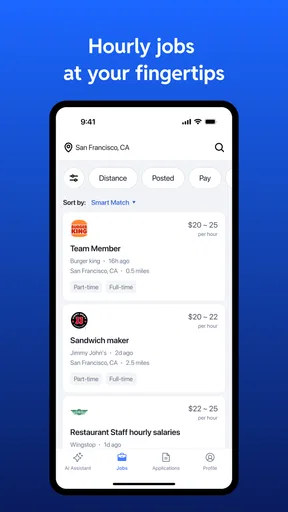
Our Review of Workstream US
 Analysis by Appyee
Workstream US is a business app from Workstream.is built around a simple idea: give hourly teams a practical way to handle work-related tasks while away from a desk. I approached it as someone who might need to check in with an employer, keep up with workplace information, or manage routine HR interactions from a phone rather than a computer. That focus makes it more relevant to shift-based workers than to people looking for a broad personal productivity tool.
The app is free to install and use, which immediately removes one of the biggest barriers for hourly employees who may not want another monthly expense. It is rated for Everyone, runs on Android 8.0 and later, and the current release is v2.12.8. Workstream.is is the developer, and the app has passed the fifty-thousand-install mark, so it is not an obscure experiment with no visible user base. Still, its average rating of 3.1 suggests a mixed experience, and that is important context before relying on it for anything time-sensitive.
How Workstream US fits into everyday work
My first impression is that Workstream US makes most sense as an employer-connected tool rather than a standalone app that anyone can open and use independently. Its purpose is tied to hourly teams, so the usefulness depends heavily on whether a workplace actually uses Workstream and how that organization has configured its employee processes. In other words, downloading it is only the first step; the real value appears when it is connected to the routines of a particular job.
That distinction matters because many people instinctively compare a business app with familiar consumer tools. A calendar, messaging app, notes app, or general task manager can be useful without an employer account. Workstream US is different. It is intended to sit closer to the employee-and-manager relationship, where workplace actions and information are more important than personal organization. If your employer does not use it, the download alone is unlikely to transform your workday.
I would describe it as a mobile HR doorway for hourly staff. The advantage is convenience: a worker can deal with work matters from a phone instead of waiting until they reach a shared terminal or office computer. The limitation is equally clear: the app cannot replace the employer’s own policies, manager communication, payroll procedures, or official support channels. It is a tool for accessing workplace processes, not a substitute for understanding them.
The cost question is refreshingly simple
There is no purchase price attached to the app. That makes the financial decision straightforward for an employee: installing Workstream US does not require paying for a premium tier or committing to a subscription. For a person already asked to use it by an employer, free access is a meaningful advantage, especially when the app supports tasks connected to an existing job rather than a hobby or optional service.
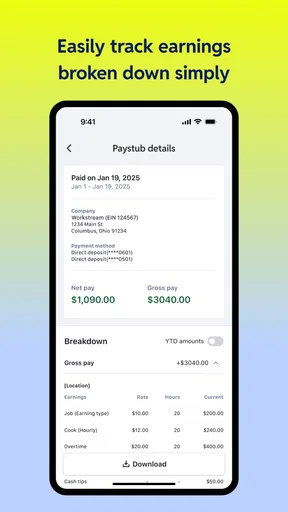
At the same time, “free” should be interpreted carefully. The lack of a listed charge does not mean every workplace process becomes free or that the app covers employment-related costs. It only tells me that the app itself is available without a stated purchase price. Wages, benefits, payroll arrangements, scheduling decisions, and employer policies remain separate matters. I would not treat the app’s free status as a reason to assume anything about those areas.
This is also why I would avoid comparing it with paid HR software based only on sticker price. An employer may choose different systems, and employees generally do not select the underlying workplace platform themselves. For an individual worker, the practical value is less about saving money against another app and more about whether Workstream US makes required work interactions easier. Since the app costs nothing to download, the real test is time saved, clarity gained, and fewer trips to a manager or office terminal.
Where the value shows up during a shift-based week
The strongest use case is the employee who needs work information while moving between shifts, locations, or responsibilities. Hourly workers often do not spend their day at a desk, so a mobile route into HR-related tasks can be more convenient than a browser-based system designed around office staff. I found the concept most convincing for people who check their phone before or after work and need a direct connection to workplace routines.
Consider a realistic scenario. You finish an evening shift and remember that you need to deal with an employment-related task before your next scheduled workday. Instead of waiting until you are back at a workstation, you open the app from home and handle whatever your employer has made available there. The benefit is not flashy; it is the removal of a small but repeated obstacle. For hourly workers, those small obstacles can accumulate quickly when every task requires a separate conversation or a visit to a manager.
A second useful angle is consistency. When a workplace gives employees one recognized mobile channel, it can reduce the confusion caused by scattered messages, paper notices, and informal instructions. That does not guarantee a smooth experience, because the employer still controls how well the process is organized. But when the setup is sensible, having a dedicated work app can make it easier to remember where to look first.
There is also value in separating work administration from personal apps. Using a general messaging service for employment matters may be convenient, but it can blur personal and professional communication. A dedicated business app gives employees a clearer place to begin when the question concerns their job. I would not call that a complete privacy or communication solution, but it is a more focused workflow than searching through personal chats.
Three practical habits that make the app more useful
My first recommendation is to treat Workstream US as a starting point, not the final authority. If an in-app item affects attendance, pay, scheduling, or another important employment matter, I would keep a personal note of what was submitted and when, then follow the workplace’s normal escalation route if something looks wrong. The app can make a task accessible, but accessibility is not the same as proof that an issue has been resolved.
Second, I would check the app at a deliberate time rather than repeatedly throughout the day. Hourly workers can easily turn a convenient mobile tool into another source of interruptions. A quick review before a shift, after a shift, or during an approved break is more sensible than constantly checking for updates. This habit preserves the convenience of mobile access without letting work administration take over personal time.
Third, I would confirm the employer’s preferred process before assuming every HR question belongs inside the app. Some matters may still require a supervisor, a payroll contact, or an official workplace channel. That is a subtle but important trade-off: a central app can reduce uncertainty when the organization uses it well, but it can create uncertainty if employees are expected to guess which channel handles which issue.
The app is most valuable when it removes a real workplace bottleneck, not when it is treated as a replacement for every employment conversation. That is the distinction I would keep in mind before deciding whether it deserves a permanent place on my phone.
What the rating tells me about expectations
The public response is mixed rather than overwhelmingly positive. Workstream US holds a 3.1 average from around one hundred ratings, with about fifty written reviews. I do not read that as proof that the app is poor, but I do read it as a warning against expecting a universally polished experience. Business apps are especially dependent on employer setup, account configuration, device conditions, and the quality of the underlying workflow.
For that reason, a disappointing experience may not always come from the same source. One employee may struggle with access or an employer-specific process, while another may find the app perfectly adequate for a narrower task. I would judge it based on the actual job workflow rather than the rating alone, but I would also keep a backup way to contact a manager or HR representative until I knew the app worked reliably for my workplace.
Trade-offs compared with familiar alternatives
Compared with email, Workstream US has the potential to provide a more focused destination for employee-related actions. Email is flexible, but messages can be buried, sent to the wrong person, or mixed with personal and promotional mail. A dedicated work app may feel cleaner when the employer has built a clear process around it. On the other hand, email is widely understood and does not depend on everyone learning a new platform, so it can remain the better fallback for unusual or urgent questions.
Compared with a browser-based HR portal, a mobile app is more natural for workers who rarely sit at a computer. The phone is already part of the daily routine, and mobile access can make a task feel less tied to a specific location. The trade-off is that a small screen may be less comfortable for reviewing detailed information or completing complicated forms. If a task involves careful reading, I would prefer whichever format makes errors less likely, even if that means using a browser or asking for assistance.
Compared with text messages or workplace chat, a dedicated business app can offer better separation between casual conversation and formal work administration. Chat is excellent for quick clarification, but it is not always the best place to track an important request. Workstream US appears better suited to structured employee interactions than to replacing every informal conversation. If the question is “Where do I find this work process?”, the app may be the sensible first stop; if the question is “What should I do about an unusual problem right now?”, a manager may still be faster.
Compared with a general task manager, Workstream US has the advantage of being tied to the workplace rather than requiring the employee to recreate work processes manually. A personal checklist can remind me to complete something, but it cannot provide the employer’s own route for handling that item. The reverse is also true: a personal task manager may be better for combining work reminders with errands, school, family obligations, and other parts of life. The two tools solve different problems.
Where the experience may become frustrating
The biggest limitation is dependency. Employees cannot control how much their organization uses the app, how clearly instructions are written, or how quickly workplace issues are handled. If only some processes appear in the app while others remain informal, the convenience can be diluted. I would not blame the app for every organizational weakness, but I would recognize that the employee experience is inseparable from the employer’s implementation.
There is also a learning curve, even for a product intended to simplify HR access. Any work app introduces another login, another place to check, and another set of expectations about notifications and follow-up. For someone working occasional shifts or holding multiple jobs, that extra channel may feel like administrative overhead unless it replaces something genuinely inconvenient.
Another trade-off is urgency. A mobile interface can make a task feel immediate, but not every submitted item receives an instant response. I would be especially careful with time-sensitive matters such as a schedule concern or an attendance correction. The app may be the correct place to record the issue, while a direct conversation is still necessary to make sure someone sees it promptly.
People who dislike using their personal phone for work may also hesitate. Even when an app is free, installing it can feel like bringing employment administration into private time. For those users, a workplace computer, shared terminal, or browser option may be preferable if the employer provides one. The right choice is not only about convenience; it is also about boundaries and the way a person wants to manage work communication.
Who is likely to get the most value?
I think Workstream US is best suited to hourly employees whose employers actively rely on it and who regularly need mobile access to workplace administration. That includes people who move between shifts or locations, workers without a permanent desk, and employees who find it difficult to visit an office during normal business hours. For them, the app’s main benefit is practical access at the moment a work-related task becomes relevant.
It may also suit supervisors or team members who need a consistent employee-facing channel, although the usefulness will depend on the organization’s role permissions and internal procedures. I would not assume that every user sees the same experience. A worker should judge the app based on the tasks their employer specifically directs them to complete, rather than on a broad promise that it handles all HR needs.
I would be more cautious if you work in a small team where direct communication is already fast and informal. If a manager is always available and employment tasks are rare, adding an app may create more steps than it removes. Likewise, people who need sophisticated personal planning, detailed document work, or a unified workspace across several employers may find a general productivity tool or browser-based system more flexible.
The app is also not the right choice as a replacement for professional advice. Questions involving legal rights, disputes, benefits interpretation, or serious payroll problems may require a qualified person or an official company contact. A mobile HR tool can help route a request, but it should not be mistaken for an independent advisor.
My verdict for employees deciding whether to install it
Because Workstream US is free, I see little financial risk in trying it when an employer specifically asks employees to use it. The decision should instead be based on whether it connects to a real workplace process. If it gives you a mobile path to tasks that otherwise require a computer, a manager visit, or a confusing chain of messages, it can earn its place on your phone.
I would install it with realistic expectations. Test the basic work routine, learn which issues belong in the app, and keep the normal workplace contact method available until you know how reliable the process is. Pay attention to whether the app reduces effort or merely adds another notification stream. That short trial in your actual job context will tell you more than a generic comparison with other business apps.
My final view is cautiously positive for the right audience. The free price and hourly-team focus make Workstream US a sensible option when it is part of an employer’s established workflow. The mixed 3.1 average means I would not call it a universally smooth experience, and I would skip it as a personal HR organizer if my workplace does not use it. For an employee who needs on-the-go access to employer-connected tasks, though, Workstream US offers a focused solution worth testing, provided you remember that the organization behind the workflow matters just as much as the app itself.
Workstream.is has positioned this app in the business category rather than as a general productivity download, and that is the right way to evaluate it. It is not trying to be everything on a phone. Its value is narrower: making selected work interactions more reachable for hourly teams. If that narrow purpose matches your job, the free access makes the experiment easy. If it does not, a direct manager conversation, email, browser portal, or personal task tool may serve you better.
Privacy and Permissions
See what permissions an app requests and how it handles your data.
- Location
- approximate location (network-based), precise location (GPS and network-based)
- Photos/Media/Files
- read the contents of your USB storage, modify or delete the contents of your USB storage
- Storage
- read the contents of your USB storage, modify or delete the contents of your USB storage
- Camera
- take pictures and videos
- Microphone
- record audio
- Other
- view network connections, full network access, change your audio settings, run at startup, use accounts on the device, control vibration, prevent device from sleeping
Verdict
Strengths of Workstream US
- Centralizes workplace communication, tasks, and updates in one app.
- Helps teams stay connected while working remotely or across locations.
- Reduces reliance on scattered email threads and separate messaging tools.
- Supports faster access to important work information from mobile devices.
- Can improve visibility into team activity and ongoing projects.
Limitations of Workstream US
- Some features may require a paid Workstream subscription or company access.
- The app may feel unnecessary for teams with simple communication needs.
- Frequent notifications can become distracting without careful settings.
- Performance may depend on your organization’s setup and internet connection.
- New users may need time to learn the platform’s workflow and tools.
Similar Picks in This Category
View All
LinkedIn: Community & Network
LinkedIn3.8

Zoom Workplace
zoom.com4.1

Microsoft Teams
Microsoft Corporation4.6

Meta Business Suite
Meta Platforms, Inc.4.6

Webex Meetings
Cisco Systems, Inc.4.5

TeamViewer Remote Control
TeamViewer4.4
Frequently Asked Questions
What is Workstream US used for?
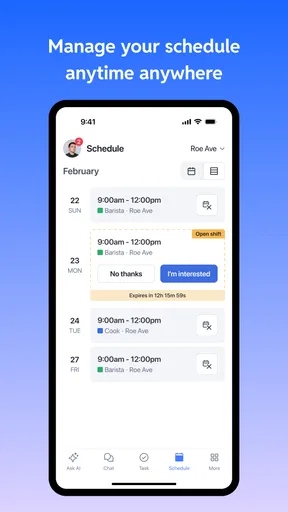
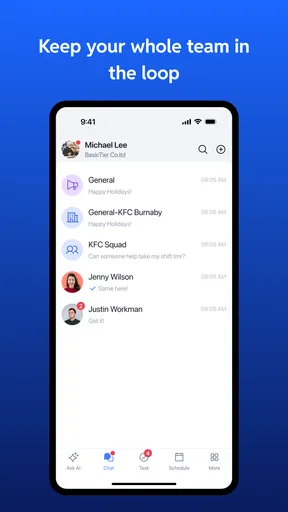
Workstream US is a workforce-management app designed to help employees and managers handle everyday workplace tasks from a mobile device. Depending on the organization’s setup, it may provide access to schedules, shift information, time and attendance tools, workplace announcements, messages, and other employment-related resources. The exact features available can vary by employer, role, location, and account permissions.
Can anyone create an account and use Workstream US?
Workstream US is generally intended for employees and managers whose organizations use the Workstream platform. In most cases, you cannot fully use the app without an invitation, company credentials, or an account created by your employer. After downloading it, users may need to select their organization, verify their identity, and follow workplace-specific login instructions. Contact your manager or administrator if activation details are unavailable.
What information or permissions does Workstream US require?
The permissions required by Workstream US depend on the features enabled for your workplace. The app may request access to notifications so you can receive schedule or workplace updates, while timekeeping or location-based functions may require location services. Camera, microphone, or storage access could also be requested for specific tasks. Review each permission carefully and allow only what is necessary for your role.
Can Workstream US be used for scheduling and clocking in or out?
For organizations that enable these tools, Workstream US can make it easier to view scheduled shifts, check workplace updates, and record attendance or work hours. Some employers may use location verification, device restrictions, or other controls when employees clock in or out. Availability and rules are not identical for every company, so the app should be treated as a workplace tool rather than a universal time-tracking solution.
What should I do if Workstream US will not let me log in or is not working correctly?
First, confirm that you are using the correct email address, phone number, password, or company login method provided by your employer. Check your internet connection, update the app, and restart your device before trying again. If the problem continues, your account may not be activated or your organization’s settings may be affecting access. Contact your manager, workplace administrator, or official Workstream support rather than creating an unrelated account.
